
Campaign tools tutorial
Hashing your email list
Last updated October 25, 2024
One of the most annoying things you may ever need to do as a digital campaigner is hash your email list! Let’s demystify what this means, why you’d do it, and how to do it.
🤷♂️ What is list hashing used for?
The most common reason why you’d hash your email list, in digital campaigning, is to compare your email list to someone else’s list – without either party actually being able to read the email addresses and upload them to their own mailer.
For example, imagine you’re running the digital campaign for a new U.S. Senate candidate, and the state party has agreed to send an email out to everyone on their list for you. You might send them your hashed list, so that they can exclude all the people who are already on your list from the email they’re going to send out to their list. After all, there’s no reason to recruit people to join your list if they’re already on it!
❓So what actually is list hashing?
Think of this process like translating something into another language that neither of us can read. If I hash my email address, and you also hash my email address using the same “algorithm,” the resulting hash will be the same for both of us. But neither of us can read the result. We can just compare the results, and see if the values are the same.
More specifically, hashing involves taking a string of characters and transforming it into a fixed-size string of characters, using a “cryptographic hash function.” 🤔
🤨 Couldn’t someone just “un-encrypt” the hashes?
No… with caveats.
We use special encryption algorithms that are considered “one way,” meaning that they can be encrypted but they can’t be easily decrypted, or reversed. There’s no website you could put a hash into and just get it “unhashed.”
The caveat: Some algorithms that have been used for list hashing have, over time, become easier to “crack” using a variety of methods. As computers get more powerful, we can do things we couldn’t do in the past, of course!
To remedy that problem, we have to use more sophisticated algorithms to encrypt things as time goes on.
But it’s important to know that when we’re doing this process, which we’ll talk about more below, we’re generally working with professional colleagues and acquaintances – so we don’t often need to take maximum security measures, so much as simply the measures that make it more difficult for others to do something we don’t want them to do, and then simply trust that they’ll do the right thing.

🧑🏫 What’s the process to hash an email list?
Click here to open a flowchart image explaining the process
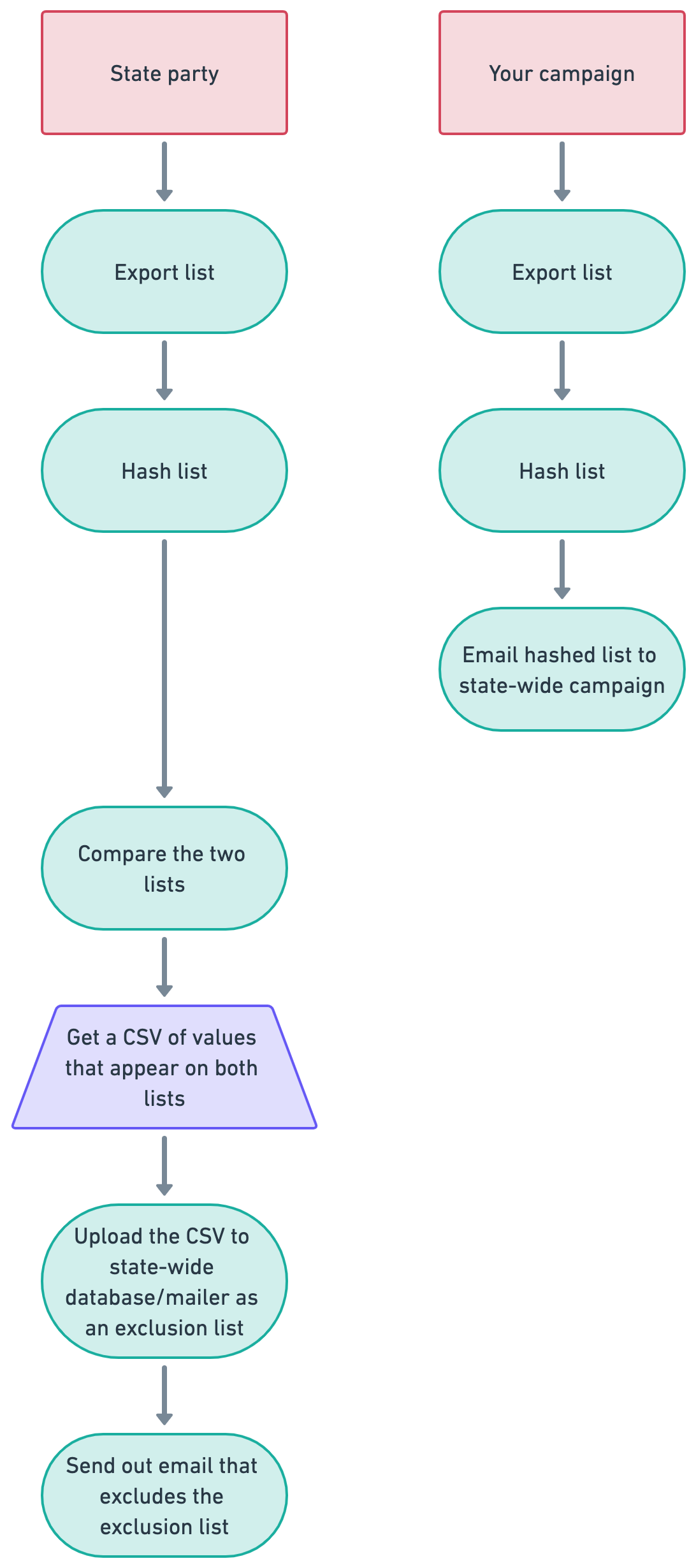
Written steps
- Both parties export their email lists from their databases.
- Your campaign only needs to export your list of email addresses, and nothing else.
- The state party would need to export both their email addresses, and the corresponding unique ID value for each email record in their database. This allows them to match back to their database the overlapping email addresses that result from this process.
- Both parties “normalize” their email addresses in the file.
- Because hashing is case sensitive – This, this, and THIS all result in different hashes – you’d need to force all your email addresses into a single case, and let the state party know which case you used, to ensure they use the same case for an accurate match.
- Some hashing tools will do this for you. If you’re using one that doesn’t, you’ll need to open your list in a spreadsheet and use the =lower() function to lowercase everything before you share it.
- Both parties use a tool to hash their email lists.
- We’ll talk more about that kind of hashing tool – and hashing algorithms – below.
- Your campaign sends its hashed list to the state party, secure in the knowledge that they cannot see your actual list of email addresses and unintentionally (or intentionally 🤡) upload your list to their mailer and send out emails to those people.
- The state party then uses a tool to quickly compare the hashed values in their hash list and your hash list.
- A file with all the overlapping values is produced.
- This list should include the unique ID value for each email record in the state campaign’s database.
- The state-wide campaign takes the list of overlapping values, with the unique ID value for each record, and uploads it as an exclusion list to their mailer.
- The state-wide campaign sends out an email excluding the exclusion list.
🔒 Which hashing algorithm should I use?
Unfortunately, this is where things can get a bit complicated! Both parties involved – the one sharing their list, and the one accepting the hashed list and comparing it to their own – have to use the same hashing algorithm, in the same case (lower case, or sometimes upper case), to come up with matching hashes.
The algorithm called “md5” has the widest use among digital campaigns in the progressive space, but this algorithm is the least secure. Many still use it since it accomplishes the task of making the email addresses unreadable, and we assume that none of our partners in this process are going to go to great lengths to crack an md5 file – but it’s worth considering a couple things about this assumption:
- We’re not always the only people reading our files. Email is an insecure medium, so if you’re sharing your hashed list over email, it’s entirely possible someone could intercept your file and crack those hashes.
- Files aren’t always handled with care. We’re all busy people and not everyone is super well-versed in data security and best practices, like deleting files after they’re used! It’s possible that your hashed email list file could hang around someone else’s computer for a long time. Computers occasionally get stolen or hacked, and your files could end up in the wrong hands long after you’ve sent them.
The difficulty in using a new – and more secure – hashing algorithm is that many people in this space are working with tools they didn’t create. Often, those tools were created by overstressed data team members, consultants, or for-hire programmers who aren’t available to help update a hashing and/or list comparison tool to use a new algorithm. So when you’re sending your list to someone else, you may be at the mercy of whatever tool they have to run the comparison – which may use an outdated encryption algorithm like md5.
🎛 What other algorithms exist for list hashing?
In short:
- 1️⃣ SHA-1 is another option that is sometimes used for list-hashing purposes among progressive digital campaigns, but it is not considered secure.
- 2️⃣ SHA-2 is a family of encryption algorithms. One of the variants, SHA-256, has never been successfully cracked (so far!) and is probably the best option to use, whenever possible.
- 3️⃣ SHA-3 is a newer family of encryption algorithms that works differently than SHA-2. Although many see it as better than SHA-2, the fact that it’s newer means it’s been tested in the wild less than SHA-2. There have been a few identified weaknesses of SHA-3, but it would still be far more secure than md5 or SHA-1.
You may have also heard of “bcrypt,” which is considered very secure, but it’s not an option for list hashing. (It’s used for password hashing on websites, a different process entirely.)
If you’d like to read more in depth about hashing algorithms and how they work, check out this article:
https://codesigningstore.com/hash-algorithm-comparison‼️ Wait, so how do I actually hash my list???
Well, there are some options. But the challenge here is that if you’re not a programmer, any hashing program you use is going to feel like a bit of a risk since you don’t actually know what’s going on behind the scenes. The question you’re always asking is whether a method for hashing your list is saving your file behind the scenes, completely defeating the purpose of hashing your list in the first place.
If you can write yourself a program to hash your list, you probably wouldn’t need this tutorial in the first place! So to a certain extent, you – as someone who can’t do that, and is reading this tutorial – are forced to trust that the program you use for list hashing is doing only what you ask and not saving anything behind the scenes.
There are two online options for hashing your list that you could use. In both cases, these sites can be used offline to give you some assurance that they can’t actually steal your data. So go to either of the URLs below, turn off your WiFi, and use the hashing prompt on the site. Then download your file. After, close the that site’s tab and then turn on your WiFi again. With this process, you can rest assured that the site was not able to store your list file because there would be no way for your file to reach their server while you’re no online.
👈 This tool works in the md5 hashing algorithm which, as we said above, is not secure. But you can both hash your list on this site, and compare two hashed files.
👈 This tool uses SHA-256, a much more secure algorithm, but cannot compare files – just hash your list for you.
🖥️ CampaignHelp Email Hasher Tool & Mac App
If you’d prefer to do your hashing on your own computer, you can use a very simple app that will normalize your list to upper or lower case, and allows you to choose the hashing algorithm you want to use.
You can find the code for this program at the link below, with instructions on how to install and use it. It’s written in Python, which is a fairly simple and straightforward coding language you can scan – even without any programming experience – to get a sense of what it’s doing before you use it.
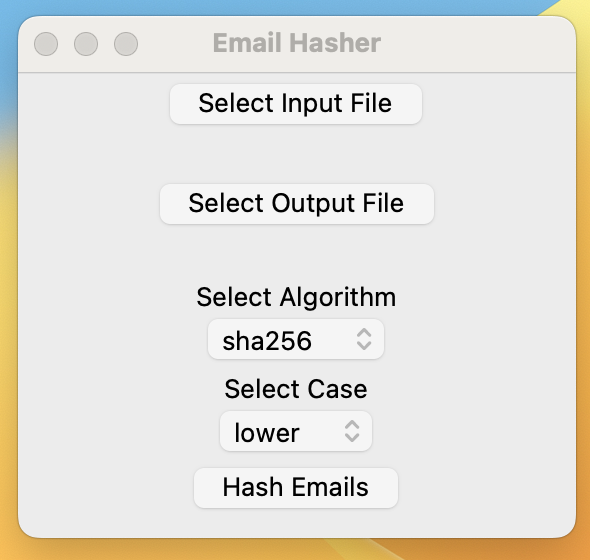
Running that script does require a bit of mucking around with Terminal.
Frequently Asked Questions
Who should I include in my list export?
It’s worthwhile considering what portions of your list you want to include in the download – sometimes it’s not necessary to download your entire list and manipulate it, particularly if it’s larger than a million lines (which can’t be opened in Excel or other spreadsheet apps).
In a situation like the one we explained above – where you’re asking someone else to send an email recruiting people to your list, but they don’t want to send to people who are already on your list – you want to find the people currently on your active list. It’s probably not necessary to exclude people who have already unsubscribed. And you probably don’t want to include anyone who’s a bouncing address!
Filtering your list, however, requires that you have some understanding of your own database/CRM/mailer, so you can actually get the list you want out of it. But if you can find a way to filter down to only the people who are actively on your list, you can send a smaller list and perhaps reactivate some people!
What’s a “salt password”?
To increase the security of a hashing algorithm, you can include a password as part of the hashing process. This is called a “salt.” Both parties would need to know the password when they’re hashing their lists, otherwise the resulting hashes would not match.
This protects the hashed files even further because less secure hashing algorithms, like md5 or SHA-1, which have been cracked, become significantly more difficult to crack without the salt password.